Oh wonderful times in the #WordPress Kingdom. The technical name for a “code block” in wp land is “customHTML” just so you are aware. There is actually an open issue to change this… IMO honestly it is confusing.
CHECK IT OUT:
If you check this page: https://wordpress.org/documentation/article/custom-html/
You will see it in action. It was only updated 3 days ago or so see here: https://web.archive.org/web/20260523065310/https://wordpress.org/documentation/article/custom-html/
It was not mentioned at all in the 7.0 release changelog! at least not on the main one. That is why I am sharing with the #Fediverse
THE GOTCHA…
It loads JS BEFORE your HTML… I am going to assume this is not by accident. It discourages you from simply dumping in stuff after the DOM. At first it can be tricky if you are converting from the old block system and use inline JS.
It fits in with my theme perfectly id say, if you want to check that out its here: I just ensured 7.0 compatibility.
Oh there is a CSS bug in the WordPress Core that hides the scroll bar in the text areas, but the Github people are on it already, or at least close.
https://github.com/peteroe75/mlark-wp-theme
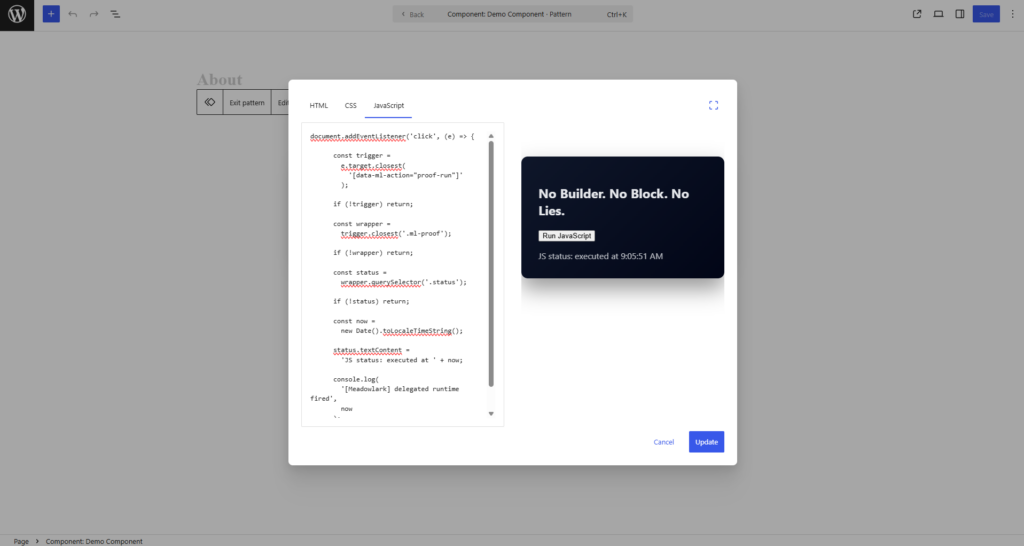
Why this is awesome?
WordPress has lacked native JS facilities for its entire life the way I see it. You needed to “bolt it on manually” or “inline” there was no “middle ground”
It is very funny when I was making my theme I needed to address this lack of function. WP core sanitizes JS in the DB on retrieval but it does not offer really any way to “put it there” other than inline in like the customHTML block.
So now we have a tab! Finally, a real WP core facility for dumping JS all over where it will cause problems, maybe look cool sometimes, and ah, what a time to be alive. I am being facetious, I really do like this. It also implies a correct usage instead of ad hoc “hope you are a real dev” mentality of WP. It reduces the drop off if you will, love it.
In the age of #ai this is going to be killer.